Embroidery-Stitch-File-Catalog
🧵 Embroidery Stitch File Catalog v1.0.0
A fast, offline Python application that recursively scans your Husqvarna embroidery library (.vp3, .hus, and .vip), intelligently collapses duplicate hoop sizes into a single card, renders cached PNG thumbnails across all CPU cores, and generates a sleek, searchable HTML catalog grouped by category folder.
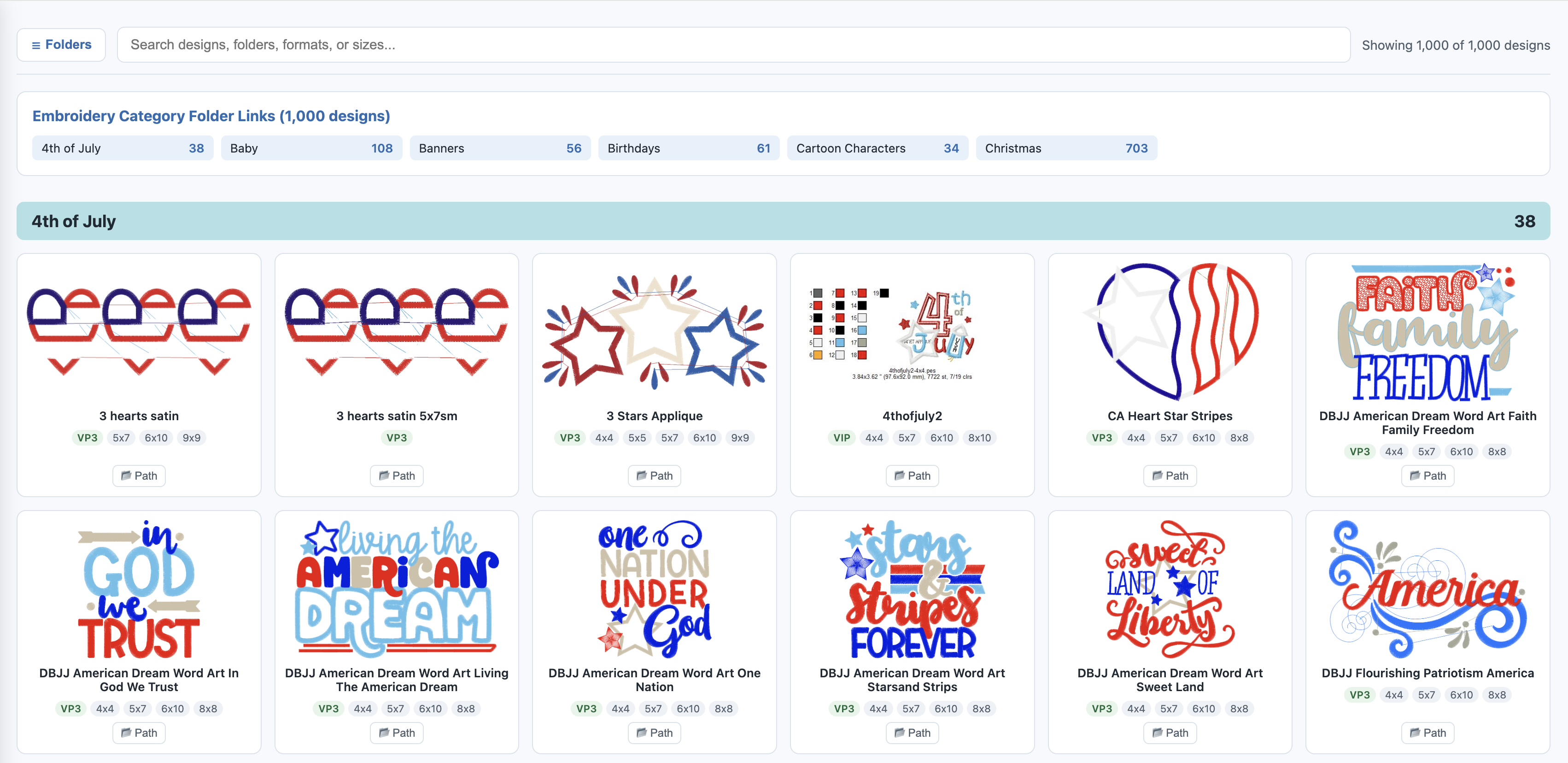
🖼️ Web Viewer Preview
✨ Enhancements & Features
| Feature | What It Does |
|---|---|
🧵 Multi-Format Support (.vp3, .hus, .vip) |
Renders .vp3 and .hus natively via pyembroidery (with automatic .jpg/.png fallback if a file cannot be decoded) and pairs .vip designs directly with their accompanying folder image. |
| 📐 Smart Size-Aware Deduplication | Strips hoop dimensions (4x4, 5X7, 6x10, birthdayballoons4x4, 130x180mm), single-dimension sizes (5inch–8inch, 15cm, 130mm), and size labels (small, med, large, xl) to merge variants into one card while keeping numbered designs (like 04 block vs. 05 block) separate. |
| 📁 Cross-Subfolder Merging | Automatically collapses size or format variants even when organized into sibling subfolders (such as 5inch/, 6inch/, 4x4/, or VP3/), picking the highest-priority format (.vp3 → .hus → .vip) and largest size as the preview thumbnail. |
| ⚡ Multi-Core Rendering & Caching | Uses ProcessPoolExecutor to render missing PNGs across all CPU cores, skips already-cached thumbnails, prevents filename collisions across subfolders, and prunes excluded directories in place during os.walk. |
| 🔍 In-Page Lightbox Pop-Up | Clicking any thumbnail opens a full-size modal preview with Prev / Next navigation (plus ← / → arrow keys and Esc to close), format/size badges, a directory tree, and a one-click Copy Path button. Clicking the design title never triggers a file download. |
🌳 Visual Directory Tree (📂 Path) |
Clicking Path on any card expands an indented folder tree from your root embroidery directory down to the exact subfolder and lists every stitch file in that design group (highlighting the primary thumbnail file) with a Copy Folder Path button. |
| 🧭 Dual Navigation (Top Menu + Slide-Out Drawer) | Keeps the full category jump grid at the top of the page and adds a pinned ☰ Folders button in the sticky search bar that slides out a filterable side navigation drawer from anywhere on the page. |
| 🔎 Instant Multi-Word Card Search | Debounced, card-level search filters individual designs by name, folder, format, or hoop size, updates per-category counts live, hides empty sections, and uses loading="lazy" so catalogs with thousands of designs open smoothly. |
| 🧹 Rebuild & Clean Options | Includes recreate_images / --recreate-images to force re-rendering and clean_images / --clean-images to wipe old cached folders in Catalog/images/ (while preserving K+N_favicon.svg). |
| 🏷️ macOS Finder Comments | Automatically writes the relative stitch file path into each rendered PNG’s Spotlight/Finder comment via osxmetadata when running on macOS. |
🗺️ Application Flowchart
flowchart TD
    A["⚙️ Start: Load config.ini & CLI Flags<br/>(--clean-images, --recreate-images)"]:::start
    B["📂 Ensure Catalog/ & images/ Exist<br/>Copy K+N_favicon.svg"]:::step
    C{"🧹 clean_images<br/>enabled?"}:::decision
    D["🗑️ Clear Catalog/images/ Subfolders<br/>(Preserve K+N_favicon.svg)"]:::warn
    E["🔍 Walk Embroidery Root Tree<br/>Prune Excluded & Hidden Folders In-Place"]:::step
    F["📐 Normalize Filenames & Group Variants<br/>Strip 4x4, 5inch, small/xl & Merge Sibling Size Folders"]:::process
    G{"🧵 Best File Format<br/>(.vp3 > .hus > .vip)"}:::decision
    H["⚡ .vp3 / .hus<br/>Check Cache or Queue for ProcessPoolExecutor"]:::render
    I["🖼️ .vip<br/>Match Accompanying .jpg / .png"]:::vip
    J["🎨 Render Missing PNGs in Parallel<br/>Write macOS Finder Comments + Fallback to JPG on Error"]:::render
    K["🌐 Generate Responsive HTML Catalog<br/>Top Menu + Slide-Out Drawer + Lightbox + Path Tree"]:::output
    L["🚀 Save Catalog/Embroidery_image_table.html<br/>& Open in Browser"]:::done

    A --> B --> C
    C -- Yes --> D --> E
    C -- No --> E
    E --> F --> G
    G -- ".vp3 / .hus" --> H --> J
    G -- ".vip" --> I --> K
    J --> K --> L

    classDef start fill:#1e3a8a,stroke:#1e40af,color:#ffffff,font-weight:bold
    classDef step fill:#2563eb,stroke:#1d4ed8,color:#ffffff
    classDef decision fill:#f59e0b,stroke:#d97706,color:#1f2937,font-weight:bold
    classDef warn fill:#ef4444,stroke:#dc2626,color:#ffffff
    classDef process fill:#8b5cf6,stroke:#7c3aed,color:#ffffff
    classDef render fill:#0d9488,stroke:#0f766e,color:#ffffff
    classDef vip fill:#ec4899,stroke:#db2777,color:#ffffff
    classDef output fill:#0ea5e9,stroke:#0284c7,color:#ffffff
    classDef done fill:#10b981,stroke:#059669,color:#ffffff,font-weight:bold
📂 Expected Directory Structure
Top-level folders inside root_embroidery_directory automatically become categories in both the top menu and the slide-out ☰ Folders drawer:
Embroidery Thumbnails/
├── _My Designs/
├── 4th of July/
│   ├── 3StarsApplique+-+EB/
│   │   ├── 3 Stars Applique 4x4.vp3
│   │   ├── 3 Stars Applique 5x5.vp3
│   │   ├── 3 Stars Applique 5x7.vp3
│   │   └── 3 Stars Applique 6x10.vp3
├── Baby/
│   └── DBJJ Sleepytime Critters/
│       ├── DBJJ Sleepytime Critters Applique2 04 block 5inch.vp3
│       ├── DBJJ Sleepytime Critters Applique2 04 block 6inch.vp3
│       └── DBJJ Sleepytime Critters Applique2 04 block 8inch.vp3
├── Birthdays/
└── Catalog/                              # Auto-created output folder
    ├── Embroidery_image_table.html       # Generated interactive viewer
    └── images/
        ├── K+N_favicon.svg               # Preserved during --clean-images
        ├── 4th of July/
        └── Baby/
⚙️ Configuration (config.ini)
Copy config.sample.ini to config.ini in the project folder and customize your paths and preferences (config.ini is git-ignored so your personal paths stay private):
cp config.sample.ini config.ini
[General]
root_embroidery_directory = ~/Documents/Embroidery Thumbnails
embroidery_start_directory = ~/Documents/Embroidery Thumbnails
catalog_directory =
excluded_folders = Alphabets & Monograms, Catalog, Images, Colorcharts
table_cols = 6
max_files = 100000
log_level = info
recreate_images = false
clean_images = false
| Setting | Default | Description |
|---|---|---|
root_embroidery_directory |
— | Root embroidery library folder. |
embroidery_start_directory |
— | Starting folder to scan (can be the root or a specific category subfolder). |
catalog_directory |
<root>/Catalog |
Optional custom output folder for the HTML catalog and images/ (e.g., an iCloud Drive folder). |
excluded_folders |
Alphabets & Monograms, Catalog, Images, Colorcharts |
Comma-separated folder names/keywords skipped during scanning (case-insensitive). |
table_cols |
6 |
Maximum number of card columns in the responsive grid on wide screens. |
max_files |
100000 |
Maximum number of deduplicated unique designs to include. |
log_level |
info |
Console verbosity: debug, info, warning, error, or critical. |
recreate_images |
false |
Set true to re-render PNGs for all scanned designs even if cached. |
clean_images |
false |
Set true to delete all folders/files in Catalog/images/ (except K+N_favicon.svg) before rendering. |
🚀 Installation & Usage
1. Install Dependencies
pip install -r requirements.txt
2. Run the Catalog Generator
# Standard run (uses cached PNGs, renders only new designs)
python3 Embroidery_Stitch_File_Catalog.py

# Force re-rendering all scanned thumbnails
python3 Embroidery_Stitch_File_Catalog.py --recreate-images

# Wipe all cached image folders (keeping K+N_favicon.svg) and rebuild cleanly
python3 Embroidery_Stitch_File_Catalog.py --clean-images
💻 Operating Environment
- Built for Python 3.10+ (tested on macOS with Python 3.14 and
pyembroidery 1.5.1). osxmetadatais optional and automatically skipped on non-macOS systems.